Search below for sign-in and invite help, running the weekly meeting, and workspace
setup. Most questions are answered here; if yours isn't, the contact form is waiting at the bottom.
Every team starts from a seven-step, 90-minute default agenda, no setup and no
facilitator training required. Leaders can reorder, hide, or retime any section to fit their team.
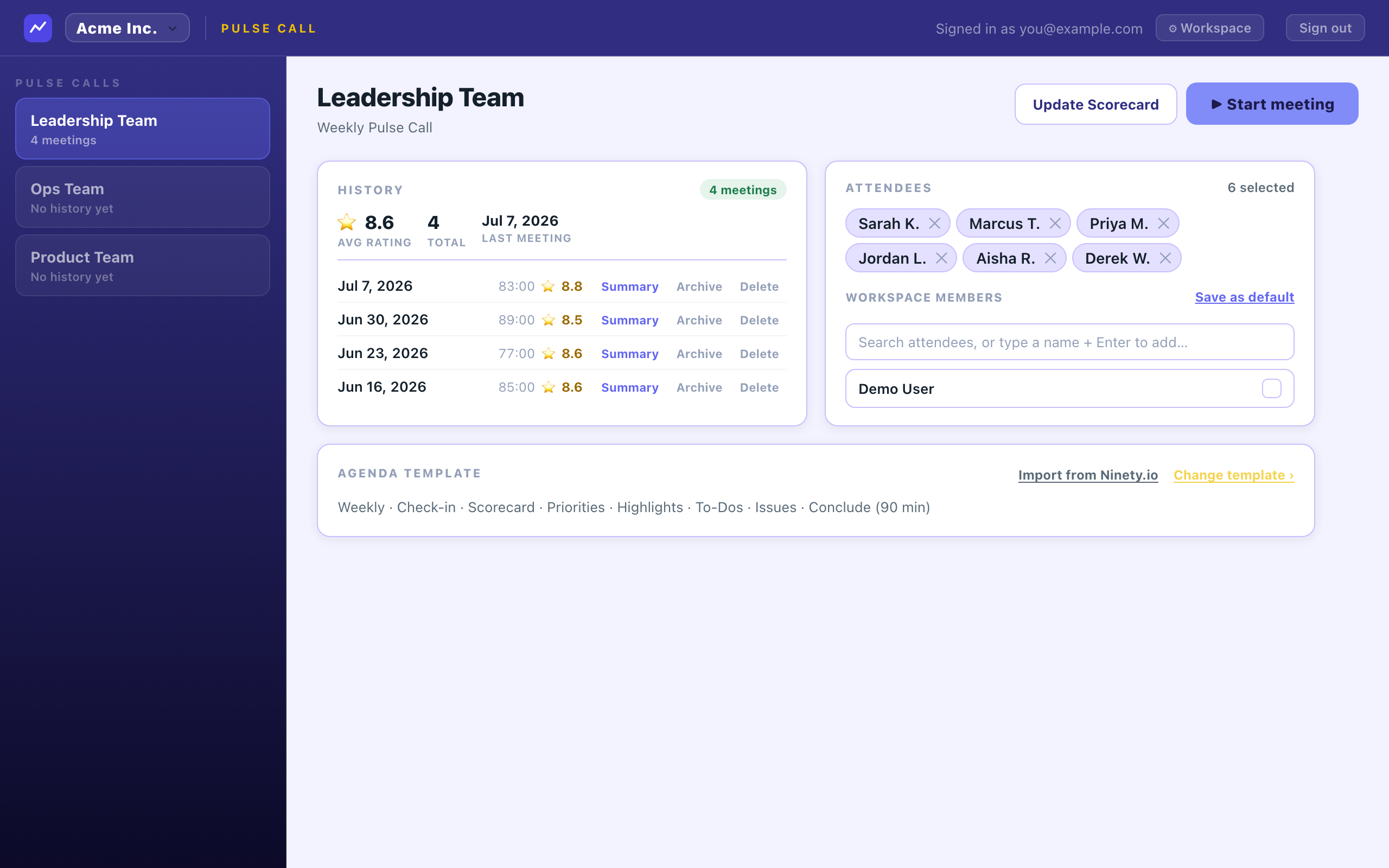
Before the meeting: everyone's priorities, open to-dos, and last week's history in one screen.
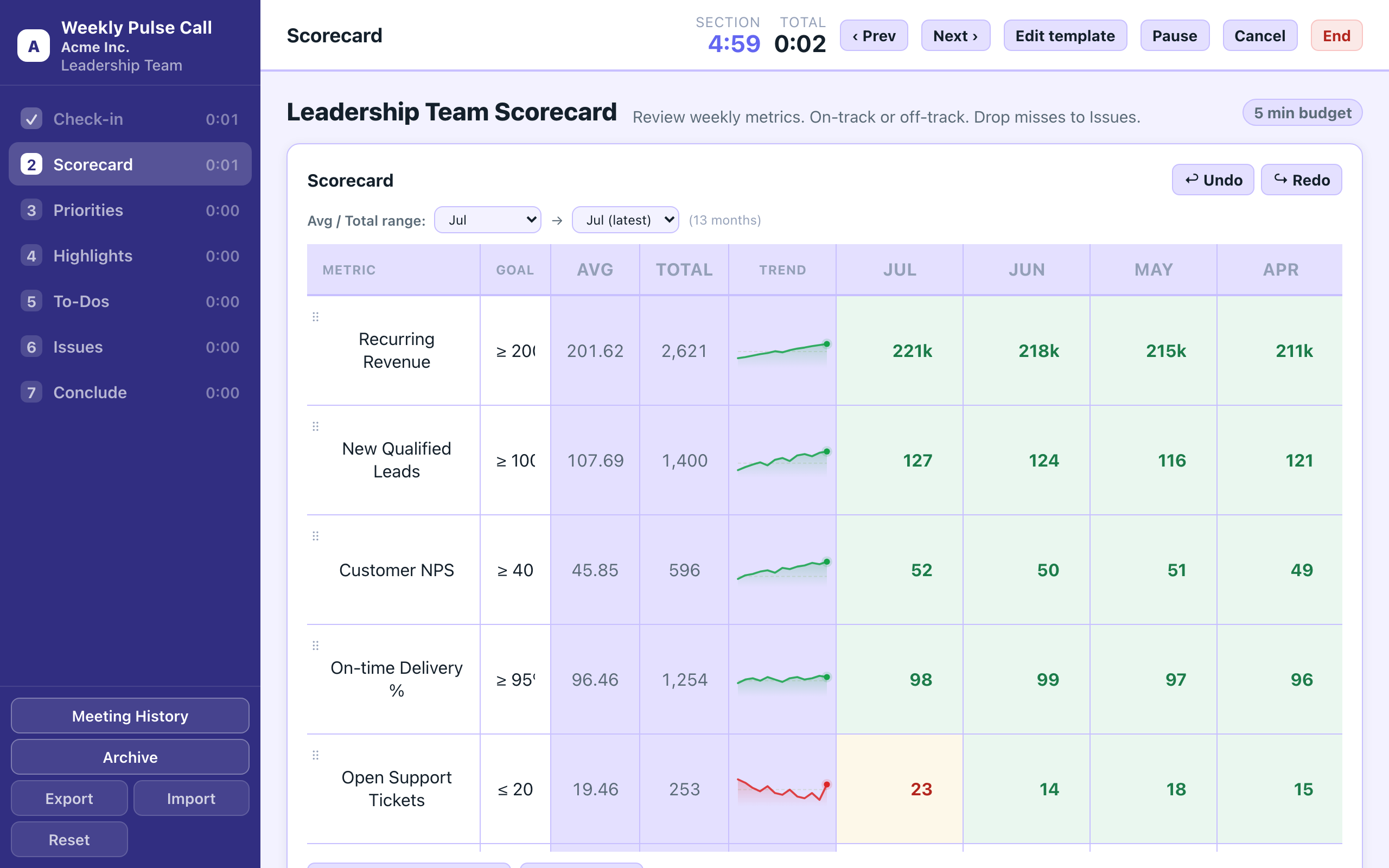
During the meeting: the scorecard runs live with a built-in timer, so the room stays on the numbers.
Priorities (sometimes called "rocks") are each person's quarterly goals, reviewed weekly as simply on-track or off-track. To-Dos are the specific one-week commitments that came out of last week's meeting: did they get done or not. Issues is the IDS list (Identify, Discuss, Solve) where anything off-track from the scorecard or priorities lands, gets a real decision, and gets an owner before the meeting ends. It's the longest block on purpose: 60 of the 90 minutes.
Yes. From "Change template" in team settings, a leader can drag sections into any order, hide any section except Conclude (which is always required), and set a custom time budget (1 to 180 minutes) for each one. There's also an optional Calendar section, off by default, and a cadence toggle to run the whole template weekly or monthly. "Reset to default" brings back the standard 7-step, 90-minute agenda anytime.
A team (workstream) is a group inside your workspace that runs its own weekly meeting and keeps its own scorecard, priorities, and issues, e.g. "Leadership" and "Ops" as two separate teams sharing one company workspace. See Workspace & seats below for how many teams each plan allows.
Yes, anytime: export your full history (scorecards, priorities, to-dos, issues) as JSON straight from the app. It's your data, not something held hostage in a proprietary format.
Yes. Enginely can import rocks, to-dos, issues, and headlines directly from Ninety's XLSX exports, so your team doesn't start from a blank board.
The weekly agenda follows the same well-known structure that "Level 10 Meeting"-style tools use (check-in, scorecard, priorities, issues) because it's a genuinely good format for running a focused meeting, not because we're affiliated with EOS Worldwide, Ninety, or Bloom Growth. Enginely is an independent product; no coach or licensing required, self-serve from day one. See the full comparison on the EOS alternative page.
02
Workspace & seats
One workspace per company (or business unit), teams inside it, seats shared across
the whole workspace.
Anyone who has signed in to your workspace counts as one seat, no matter how many teams they're on. Free includes 10 seats and up to 3 teams; Team includes 25 seats; Business includes 100 seats and unlimited teams. Need more than 100 seats? Contact us and we'll work out a custom plan. Remove inactive members anytime to free up a seat. Full pricing on the Pricing page.
From workspace settings, an owner or admin enters a teammate's email and Enginely sends them an invite email with a one-click link. You can also copy the invite link directly and share it yourself (Slack, Teams, etc.) instead of sending the automated email. Invite links are single-use, tied to that exact email address, and expire after 14 days.
Owner: the billing-responsible account; can invite/remove members, create teams, change plans, and delete the workspace. Admin: can invite members and create teams, but doesn't control billing. Member: participates in meetings and teams but can't manage the workspace or seats. Being invited as a member into someone else's workspace never counts against your own plan's limits.
Free and Team plans manage one workspace at a time. Business unlocks creating and owning multiple workspaces under one account, useful for separate business units, regions, or client accounts. You can always be invited as a member of other people's workspaces regardless of your own plan.
Yes, it's on by default when a workspace is created on a corporate email domain (not a free provider like gmail.com), but an owner can switch it off in workspace settings at any time, after which every new member needs a direct invite instead.
Upgrade or downgrade anytime: upgrades take effect immediately, downgrades apply at the next billing cycle. You can run a full meeting with your team before entering any payment details; there's no trial clock to beat.
03
Didn't get your email?
Sign-in links and team invites both arrive by email. If one hasn't shown up,
here's where to look and what to do next.
Check spam/junk first: search for "Enginely" or the subject line "Sign in to Enginely" (or "You've been invited to..." for a team invite). First-time senders sometimes land in spam until your mail provider learns to trust the address. Once you find it, mark it "Not spam" and add the sender to your contacts, and the next one will land in your inbox. Links are single-use and expire after 15 minutes for sign-in (14 days for invites), so if it's been longer, just request a fresh one from the sign-in screen, or ask whoever invited you to resend it.
That's expected. Some corporate email security tools automatically "pre-visit" links in an inbound email to scan them for threats, before a person ever opens the message. If the raw link itself completed sign-in on that scan, it would burn your one-time link before your real click ever happened. So the link opens a plain confirmation page first; pressing the button on that page, an actual click rather than an automated scan, is what signs you in.
Ask your mail admin to allowlist the sender domain enginely.net rather than blocking it. Sign-in, invite, and receipt emails vary the display name but always send from that same domain.
Yes, sign-in works with any email address, personal or corporate. The one thing personal ("public") email domains don't get is automatic company workspace join, covered in Sign-in & SSO below; someone on your team would need to invite you directly instead.
04
Sign-in & single sign-on
No passwords to manage by default. Enginely uses email-based magic links, plus
automatic company-domain join for teams that want it.
Every account uses passwordless magic-link sign-in by default: enter your email, click the link, you're in. For companies, domain auto-join (below) gets teammates straight into the right workspace without an invite, which covers most of what teams actually want from SSO. A full SAML/OIDC enterprise SSO integration (Okta, Azure AD, etc.) isn't offered yet for commercial customers. If that's a hard requirement for your rollout, tell us in the contact form at the bottom and we'll follow up.
When your workspace owner turns it on, anyone who signs in with an email on your company's verified domain (e.g. anyone@acme.com) is added to the workspace automatically as a member, with no invite link and no waiting on an admin. It's enabled by default when a workspace is created on a corporate domain, and can be switched off in workspace settings if you'd rather invite people individually. It doesn't check credentials against a corporate identity provider the way SAML/OIDC SSO does (it's a domain match, not a federated login), but it gets the same "just works" result for onboarding a team.
Yes, password sign-in is available as an alternative to the magic link. Forgot your password? The reset flow is also delivered by email, and Enginely checks any new password against known data-breach lists before accepting it, so you can't accidentally set one that's already compromised.
Use "Sign out everywhere" from your account settings: it revokes every active session across every device at once, not just the one you're currently on. Follow it up with a password reset if you suspect the account itself was compromised, not just a forgotten laptop.
Invite links are single-use and locked to the exact email address they were sent to. If you're already signed in under a different account when you click it, sign out first and sign back in with the address the invite was sent to. Invite links also expire 14 days after they're sent, so ask whoever invited you to resend it if it's older than that.
Still stuck?
Send us a message
If the answer above didn't cover it, write us directly
at support@enginely.net, or use the form below —
we'll reply as soon as we can, usually within a business day.